Assignment 10
Scientific Plotting and Data Visualization with PGFPlots
Objective
In this assignment, you will produce a one page extended abstract in LaTeX and include one plot created with PGFPlots. The plot must read data from data.txt.
Instructions
Folder Structure
- Create a main folder named
Assignment10.
Steps
1. Create the data file
- Inside
Assignment10, create a file nameddata.txt. - Copy and paste the data below into
data.txt.
0.000 1.000
0.314 1.309
0.628 1.588
0.942 1.809
1.256 1.951
1.570 2.000
1.884 1.951
2.198 1.809
2.512 1.589
2.826 1.310
3.140 1.002
3.454 0.692
3.768 0.412
4.082 0.191
4.396 0.049
4.710 0.000
5.024 0.048
5.338 0.190
5.652 0.410
5.966 0.690
6.280 0.997
2. Create the LaTeX file
- Inside
Assignment10, create a file namedmain.tex. - Copy and paste the code below into
main.tex.
\documentclass[a4paper,11pt]{article}

\usepackage[utf8]{inputenc}
\usepackage{geometry}
\usepackage{pgfplots}
\usepackage{titlesec}
\usepackage{tikz}

\pgfplotsset{compat=newest}
\geometry{left=2cm,right=2cm,top=2cm,bottom=2cm}

\title{\textbf{Extended Abstract: Data Based Visualization of an Offset Sinusoidal Sensor Signal}}
\author{Your Name \\
MECH0291 Computer Programming}
\date{}

\begin{document}
\maketitle
\vspace{-0.6cm}

\section*{Abstract}
Sinusoidal signals appear in many engineering systems such as rotating machinery, vibration sensors, and alternating current measurements.
This short study demonstrates a clean workflow where raw measurements stored in a plain text file are plotted directly inside a \LaTeX\ document using \texttt{pgfplots}.
The dataset in \texttt{data.txt} represents an offset sinusoidal sensor output over one period, where the offset models a common hardware bias.

\section*{Methodology and Discussion}
The data contain two columns: time $t$ in seconds and measured voltage $V(t)$ in volts.
Unlike manual plotting tools, \texttt{pgfplots} reads the table file and creates a publication quality figure with consistent typography.
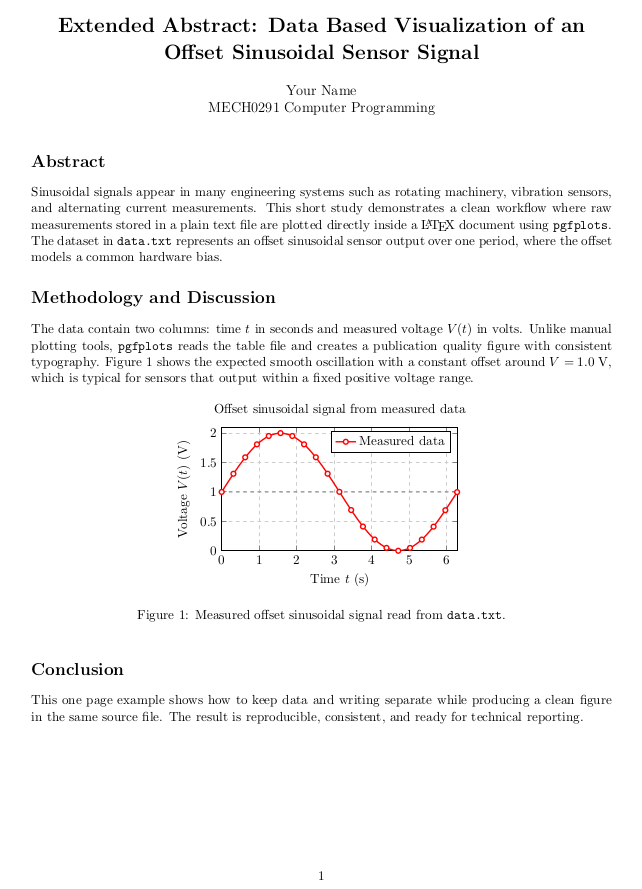
Figure 1 shows the expected smooth oscillation with a constant offset around $V=1.0$ V, which is typical for sensors that output within a fixed positive voltage range.

\begin{figure}[ht]
    \centering
    \begin{tikzpicture}
        \begin{axis}[
            width=8.5cm, height=5.2cm,
            title={Offset sinusoidal signal from measured data},
            xlabel={Time $t$ (s)},
            ylabel={Voltage $V(t)$ (V)},
            grid=major,
            grid style={dashed, gray!40},
            xmin=0, xmax=6.3,
            ymin=0, ymax=2.1,
            legend pos=north east,
            thick
        ]
        \addplot[
            color=red,
            mark=*,
            mark options={fill=white},
            line width=1.2pt,
            smooth
        ] table [x index=0, y index=1] {data.txt};
        \addlegendentry{Measured data}

        \addplot[gray, dashed, forget plot] coordinates {(0,1.0) (6.3,1.0)};
        \end{axis}
    \end{tikzpicture}
    \caption{Measured offset sinusoidal signal read from \texttt{data.txt}.}
\end{figure}

\section*{Conclusion}
This one page example shows how to keep data and writing separate while producing a clean figure in the same source file.
The result is reproducible, consistent, and ready for technical reporting.

\end{document}
3. Compile
- Open a terminal and go into the
Assignment10folder. - Run:
pdflatex main.tex
4. Verify the Output:
- Ensure that the generated `main.pdf` matches the required structure as in the figure below.
5. Clean up
- Delete every file except
main.tex,data.txt, andmain.pdf. - You can run:
rm main.aux main.log
6. Final folder check
Your final folder must contain only these files:
Assignment10/
|__data.txt
|__main.tex
|__main.pdf
7. Submit
- Submit the
Assignment10folder (with only those three files).
Submit your Assignment 10
Run this command while you are inside the Assignment10 folder:
submitAssignment.sh